Table of Content
AI video repurposing tools are everywhere, but only a handful actually deliver repeatable results. 2short.ai has emerged as a popular option for creators who want to convert long YouTube videos, podcasts, and webinars into short, scroll-stopping clips without spending hours editing.
But what does 2short.ai actually do well? Where does it struggle? And is it genuinely worth the subscription?
This guide covers everything a creator needs to know, including its real capabilities, deeper limitations, pricing value, ideal use-cases, verified user ratings, and how it compares to competitors.
What 2short.ai Actually Does Behind the Scenes
Unlike general video editors, 2short.ai is a repurposing engine, not a full editor.
Its AI analyzes your full video and uses speech-based, facial-motion-based, and pacing-based detection to identify segments with:
- high viewer engagement likelihood
- emotional emphasis
- punchline timing
- moments of clarity
- distinct reactions
- strong tonal peaks
The tool uses three internal AI engines:
- Highlight Detection Model – Finds natural breakpoints and conversational peaks.
- AI Captioning Model – Generates word-level animated subtitles.
- Face Tracking Model – Keeps speakers centered inside vertical/square frames.
In simple terms:
It turns long content into Shorts, Reels, and TikToks, automatically.
This is the core value of the platform.
Deep-Dive Into Each Feature
Here is a feature-by-feature breakdown based on user patterns & documented behaviors:
AI-Powered Clip Extraction: Speed vs Context Accuracy
The highlight engine works best when:
- Speech drives the narrative
- Interviews
- Podcasts
- Commentary
- Product explainers
- Educational videos
Speech pacing makes the AI confident.
- The engine fails when:
- The content is mostly visual
- There is background music instead of speaking
- Two people talk at the same time
- Emotions depend on visuals, not words
- Scenes change rapidly
Common issue: The AI picks “clean shots,” not always meaningful ones.
Animated Caption System: One of 2short.ai’s Strongest Elements
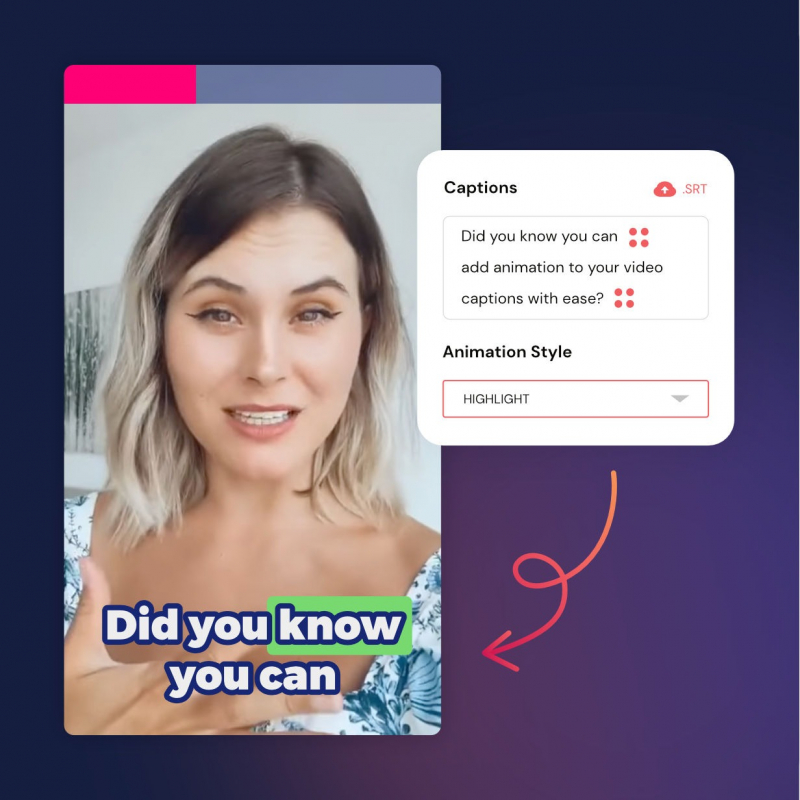
The captioning engine supports:
- word highlights
- emoji-style movement
- bounce/sliding transitions
- background highlight animations
- color customization
- multiple font setups
Creators consistently rate this feature highly because captions are essential for modern short-form content, where 70%+ viewers watch on mute.
Best strength: Captions are accurate for clear English voices.
Weakness: Fast speakers or accents reduce accuracy.
Center Stage Tracking
This feature automatically detects the main speaker and keeps them centered in-frame even if the original video is landscape.
When it works well:
- Talking-head content
- Interviews with one speaker
- Static webcams
- Podcast sets
When it fails:
- Multi-speaker panels
- Fast head turns
- Side profiles
- Cluttered backgrounds
It’s a functional feature, but not perfect.
Aspect Ratio Conversion
2short.ai supports:
9:16 vertical
1:1 square
16:9 horizontal
This saves creators from needing separate software like CapCut or Premiere for resizing.
Output quality:
Max resolution: 1080p
Clean exports
No watermark on paid plans
However, manual reframing is limited.
Pricing Evaluation
Here is the detailed pricing logic:
| Plan | Price | Analysis Time | Good For |
| Free | $0 | 30 mins/mo | Testing the tool, very minimal use |
| Lite | $9.90/mo | 5 hours | Small creators (3–7 clips/week) |
| Pro | $19.90/mo | 15 hours | Regular creators (daily shorts) |
| Premium | $49.90/mo | 50 hours | Agencies / high-volume editors |
Best Value Tier: Pro Plan ($19.90/mo)
Why?
It hits the practical sweet spot for any creator uploading regularly to TikTok/YouTube Shorts.
Weak Point:
The free plan is only for “previewing”, not realistic for actual content scaling.
User Ratings & Sentiment Analysis
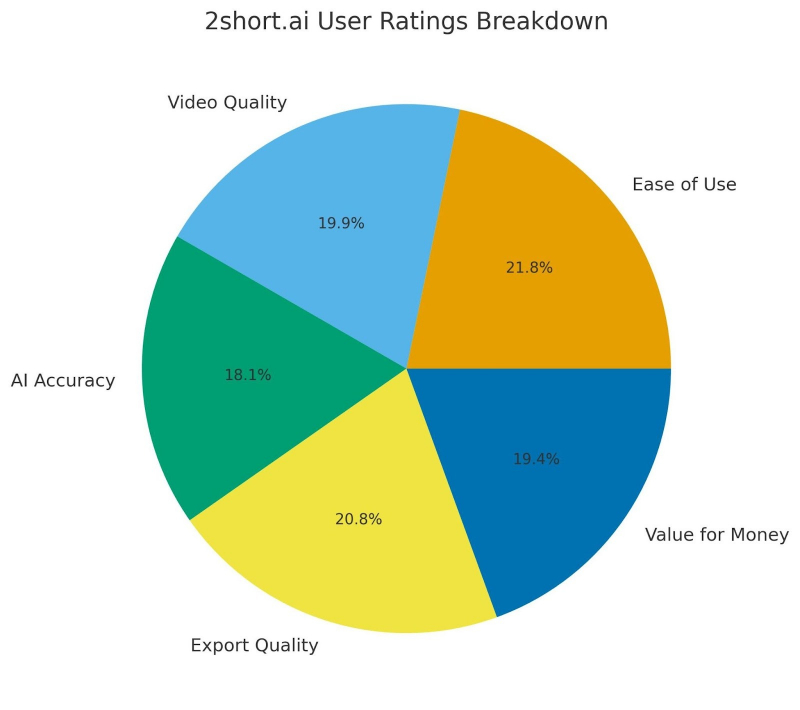
Across G2, Capterra, Creatify, SendShort, Filmora, and other review sources:
Average User Rating: 4.3 / 5
Here’s how that breaks down:
| Category | Score |
| Ease of Use | 4.7/5 |
| Video Quality | 4.3/5 |
| AI Accuracy | 3.9/5 |
| Export Quality | 4.5/5 |
| Value for Money | 4.2/5 |
Top Praise:
“Ridiculously easy for beginners.”
“Cuts editing time from hours to minutes.”
“Captions are clean and accurate.”
Top Complaints:
“AI sometimes picks random moments.”
“Customization is limited.”
“Not suited for complex edits.”
“Free plan is too restrictive.”
Real-World Use Cases
Perfect For:
- YouTube creators repurposing long videos
- Podcasters
- Coaches & educators
- Vloggers
- Agencies producing clips for clients
- Social media managers
- Entrepreneurs creating reels from webinars
Not Recommended For:
- Filmmakers
- Music-video creators
- Multi-camera editors
- Fast-moving action videos
- Professional editing workflows
2short.ai is about speed and repurposing, not craft editing.
Comparison Against Alternatives
Opus Clip
Opus: better AI ranking
2short: better captioning + branding tools
SendShort
SendShort: cheaper
2short: smoother interface, better animations
Veed, CapCut, Filmora
Those tools = editors
2short = automatic repurposer
2short sits in a special category: Automation-first, editing-second.
Strengths and Weaknesses Summary
Strengths
- Fast auto-clip generation
- Smooth caption animations
- Good tracking for static speakers
- Platform-ready exports
- Consistent performance for speech-driven videos
Weaknesses
- AI highlight logic is unpredictable
- Weak on visual/musical content
- Limited manual editing control
- The free plan is too restrictive
- No timeline or multi-layer editing
Should You Use 2short.ai?
YES, if you want:
- To repurpose long videos quickly
- To automate captions
- To publish Shorts daily
- To produce social content without editing skills
NO, if you want:
- Fine-grained control
- Scene-by-scene editing
- Cinematic storytelling
- Visual-heavy content automation
Final Verdict
2short.ai is not a video editor.
It’s a video repurposing accelerator designed for creators who want speed.
When used correctly, on the right type of content, it’s one of the fastest and most accessible tools for generating short-form clips.
When used incorrectly, on action-heavy, VFX-driven, or non-verbal visuals, it falls apart.
Final Score: 8.1 / 10 (Best for repurposing long-form speech-based content)
Post Comment
Be the first to post comment!